In this article
- How does a deposit system work?
- Why you should take a deposit for table reservations at your nightclub?
- Reduces no shows
- Financial protection
- Tips for implementing deposit in the nightclub
- Make your policy very clear
- Communicate with guests
- Other amazing features for nightclubs:
- Start free with Resos
When evening changes to night and your restaurant fills up with music, it is crucial that staff can focus on giving the best experience, and not spend time on bookings. So for that reason, we have developed a booking system for nightclub restaurants. The system allows your staff to quickly and easily manage new bookings and get a full overview of your tables. Offering guests a VIP experience and dancing has never been easier.
As we all know, VIP tables are an amazing way to create an exclusive party atmosphere for guests in your nightclub. The problem is, if a party doesn’t cancel their reservation, the nightclub loses money by holding the best table for the guests who will not show up. So to lower the chance of empty VIP tables we have created a feature that will allow you to charge a deposit for VIP tables at your nightclub. In this article, we will explain how the deposit/prepayment feature works, and why you should use it at your nightclub.
How does a deposit system work?
A deposit is the same as a prepayment, therefore the reservation deposit is money paid to a nightclub to reserve a table. For example, a deposit can be $20 per person or per booking. The Resos booking system for nightclub restaurants makes it easy to implement deposits for any type of night clubs. You can set how much you want to charge in case guests do not cancel their reservation or do not show up, and decide whether to charge a fee per booking or per person. Additionally, you can decide whether you want to charge a deposit all days of the week or only on specific days or events. Read more about how to set up the deposit feature for your nightclub.
Why you should take a deposit for table reservations at your nightclub?
Reduces no shows
Since booking a table is free for guests, some can create bookings without intending to commit, or simply they can create bookings in several places to keep their options open and forget to cancel them in time. Adopting the prepayment feature will substantially lower no-shows since there is a financial commitment from the guests’ side and it is in human nature to not want to lose a deposit once it is made.
Financial protection
Deposits help in recouping part of the money lost due to missed reservations. Although it does not cover the whole cost of the service, it is preferable to nothing. And, speaking numbers the research conducted by GO Technology report suggests lost sales from no-shows cost the hospitality industry £17.6bn per year in sales. 14% of bookers haven’t turned up for a reservation without telling the venue, so charging the deposit can play a huge role in creating financial protection for the business.
Tips for implementing deposit in the nightclub
Make your policy very clear
If you do not want any misunderstanding and bad reviews it is important to have a clear policy for every guest. Make it clear to guests how they can cancel reservations and what the consequences are of not following the policy. We understand that each nightclub is unique, therefore we give you the possibility to define your own policy and it will be available for guests under terms and conditions when they book a VIP table in your nightclub.
Communicate with guests
With Resos’ booking system for nightclub restaurants, you can easily communicate with your guests online before their visit. It also makes it possible for guests to let you know that they will celebrate their birthday or alike so that you can help contribute to their experience. This kind of communication will improve the guests’ satisfaction, which subsequently will increase the chances of them visiting your nightclub again in the future. Read more about how you can communicate with your guests here.
“The contact with the guest is smooth, being able to communicate via the system directly to the guest is something we appreciate. The booking confirmations have worked well and the guests have also shown them appreciation that they receive all information in the event of a booking / cancellation. ”
Mikaela Landing, Seaside Piren restaurant manager
Check out this case story about Seaside Piren and their experience with Resos’ booking system.
Other amazing features for nightclubs:
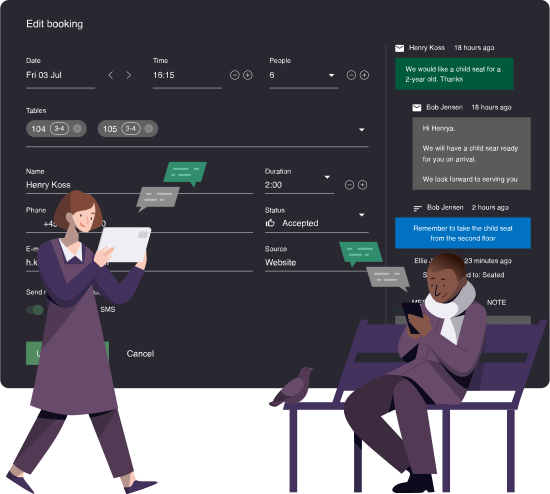
- Get a clear overview of your bookings, tables, and their availability
- Collect guest feedback after each visit and prompt happy diners to leave a review
- Communicate directly with guests in the system
- Customize Terms and Conditions
- Send reminders to guests about a reservation via email or sms
- Read more about features here.
Start free with Resos
Do you have any questions about how to get started? Or do you consider charging the deposit, but do not know how to start? Don’t hesitate to contact our customer support who is always there to help. Send an email to hi@resos.com and we will get back to you as soon as possible.