


Affordable restaurant reservation system
In this article
- Fixed monthly price no matter the number of bookings
- What is included, and what is an add-on
- Pay on a monthly or yearly basis
- Pausing your subscription for the off-season
- Start on the Free plan, upgrade when you’re ready
- The bookings count for a paid plan
- How can I pay for my subscription?
- Offers & customized deals
There are already a lot of great table booking systems out there. Some of them may have features that are very advanced. However, if you need a simple, affordable, and functional booking system that does not require a lot of changes in your daily routines, Resos is a great fit. The pricing starts with a free plan and scales affordably. Explore the benefits of our affordable restaurant reservation system here.
You do not need a sales call to sign up. Resos is self-serve, so you can create a profile, choose a plan and start taking bookings without talking to us first. If you would like the system and the plans walked through before you decide, our support team can arrange a free demo call. Ask for one at hi@resos.com or through the contact form. A demo is a walkthrough of the dashboard and the booking settings you would be setting up, not a sales pitch.
Fixed monthly price no matter the number of bookings
The beauty of Resos is that you do not get charged for the bookings you receive. Actually, Resos’ booking system has a fixed monthly price, no matter how many bookings you get.
So, you pay for the bookings you receive/add to the system, and not for the number of guests visiting your establishment. See our full pricing list here.
Resos is not usage based beyond your plan’s booking limit. There is no commission, no per-cover fee, and no per-booking charge for going over your allowance. Your plan price is the same in a quiet week and a packed one. What the booking limit does is decide which plan you belong on: pass it in any 30-day period and the plan moves up a tier, which changes the fixed price you pay, not the way it is calculated. See exactly which bookings count.
That also means we do not offer a metered plan where you pay per booking in your quiet months. If you close completely for part of the year, pausing the subscription is built for exactly that. If you stay open at lower volume, a pause will end on its own, so talk to us about the right plan instead.
What is included, and what is an add-on
Resos has four plans: Free (up to 25 bookings in a rolling month), Basic (up to 350), Plus (up to 750), and Unlimited (no booking limit). See the current monthly price for each plan on our pricing page.
Every paid plan includes online bookings, table and floor plan management, guest CRM, and reporting. The paid add-ons are: Experiences, Waitlist, Online payments (prepayments and no-show fees), Reserve with Google, Reserve with Facebook and Instagram, Custom design, Custom fields, Marketing tracking, Multiple locations, the full API, SMS booking confirmations, and Custom reminders. Every paid add-on costs the same and works the same way on any paid plan: Basic, Plus, or Unlimited. No plan bundles a specific add-on for free. The only bundle that includes every paid add-on is the Annual All-Access bundle. On a paid monthly plan, go to Menu → Settings & add-ons → Account → Billing and click Switch to annual billing: the dialog that opens has an All-Access choice next to the plain annual one. On the Free plan, Billing shows Select plan instead, which opens the plan page where All-Access is one of the tabs. Transaction fees and usage charges, such as SMS, still apply. On other paid plans, add-ons cost extra and come with a 30-day free trial. Paid add-ons are not available on the Free plan. We don’t list add-on prices here since they change; see our pricing page for current prices.
Pay on a monthly or yearly basis
Right when you thought Resos couldn’t get better, we give you multiple options to pay for your paid plan: on a monthly or yearly basis. And that’s not all, if you choose to pay for your plan on a yearly basis, you will pay the entire amount upfront, but you will get a discount of 20% compared to paying for the plan on a monthly basis.
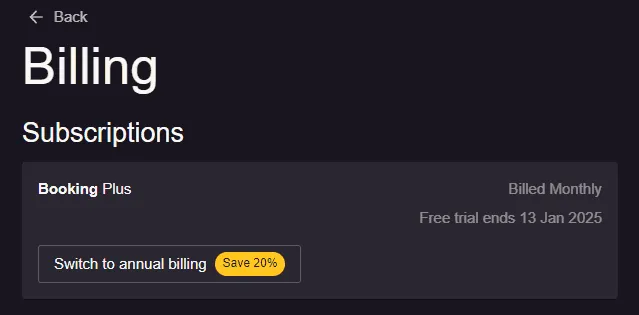
If you want to switch to an annual plan, you can do that by going to Menu → Settings & add-ons → Account → Billing.
Pausing your subscription for the off-season
If your restaurant closes for part of the year, you do not have to cancel and start over. Pause the subscription from Menu → Settings & add-ons → Account → Billing instead, and pick it back up when the season starts. The rules, the length you can set, and the thing that quietly restarts a pause early are all in pause your subscription for a seasonal closure.
If a pause does not fit your situation, you can also cancel from the same Billing page. A cancellation takes effect at the end of the current billing period rather than immediately, so you keep the system for the time you have already paid for. See how to upgrade, downgrade, or cancel for the full walkthrough.
Start on the Free plan, upgrade when you’re ready
Want to try Resos before committing to a paid plan? Start on our Free plan to see how the system fits your daily operations. All paid plans are without binding, and you can upgrade or downgrade anytime.
Don’t forget that it just takes one booking through us to make this service profitable.
The bookings count for a paid plan
You have probably noticed that each of your plans has a limit of bookings. Once this limit is reached, you will have to upgrade/choose a bigger plan if you’d like to continue taking more bookings. If you’re wondering how these limits are counted, you can find that out here.
First of all, bookings are counted as the number of bookings, and not the number of guests. So, it doesn’t matter how many guests there are on one booking as this booking will still count as 1. Furthermore, no matter what source a booking has (website, RwG, walk-in, phone, email, etc.), it will still be counted in the total number of bookings.
A paid plan counts the past 30 days on a rolling basis, so if at any time you have more bookings than your current plan allows in a 30-day window, the system automatically upgrades you to the next plan. The Free plan is counted slightly differently: it looks at the bookings created in the last month counted back from today, so that window runs 28 to 31 days depending on the month. Both are rolling windows that move every day, not a reset on the 1st of the month and not tied to the date you signed up. When you reach the Free plan’s limit, your booking page keeps taking bookings and you have 7 days to pick a paid plan from Menu → Settings & add-ons → Account → Billing. After that the dashboard only opens the plan page until you subscribe. See exactly which bookings count.
If you’d like to keep your current plan and not have the system automatically upgrade it, we can accommodate that too. However, please keep in mind that in that case, you won’t be able to take more bookings.
How can I pay for my subscription?
Pay by card or use an eligible bank debit: SEPA Direct Debit for EUR subscriptions, Bacs Direct Debit for GBP, or ACH Direct Debit for USD. Digital wallets may also be available. Checkout shows the options for your currency and account.
See supported payment methods and billing help for eligibility, changing your default method, and bank debits that are still processing.
Offers & customized deals
We run offers and promotions throughout the year, so keep an eye out. If our standard plans don’t quite fit your restaurant, reach out to our support team – we’re happy to discuss a custom deal.
Do you want to try it? We are ready to help so please reach out to us at hi@resos.com!


