


Multiple languages
In this article
- Software interface languages
- Multiple languages for internal use
- How to choose the preferred language internally
- What language do printed reservation signs use?
- Booking link/widget languages
- Multiple languages for external use
- How to choose the preferred language externally
- Text you write yourself is not translated
Our software is built to cater to a diverse global audience by offering multiple language options. Both the Resos software interface and the booking page/widget for your guests is available in various languages so that the restaurant staff and your customers have their needs met.
Note: Our software together with its languages package are continually expanding. If the language you, your colleagues or your guests need is not currently available, feel free to contact our support team to make a suggestion. We’re always looking to improve ourselves and make sure that you have everything you need to keep your employees and customers happy!
Note: If the staff users or the guests don’t choose a specific language themselves, the internal system together with the booking page/widget will take the browser language and automatically display all the text in that specific language. However, if the booking system or the booking flow doesn’t display the same language as the browser and the employee or the guest prefers this language, then we recommend clearing the cookies for the internal interface and for the booking page and everything should be displayed properly.
Software interface languages
Since Resos offers the option to create several users, each user can choose the language for their profile. This won’t be the same with the language chosen by the rest of the users, nor will it be the same with the language the guests choose for the booking page/widget.
Multiple languages for internal use
Currently, Resos supports the following 14 languages for the internal software interface (the dashboard):
-
Albanian
-
Catalan
-
Danish
-
English
-
French
-
Georgian
-
German (including a Swiss German variant)
-
Hungarian
-
Italian
-
Latvian
-
Norwegian
-
Portuguese
-
Spanish
-
Swedish
How to choose the preferred language internally
There are two ways to set up your profile in the language that suits you the most:
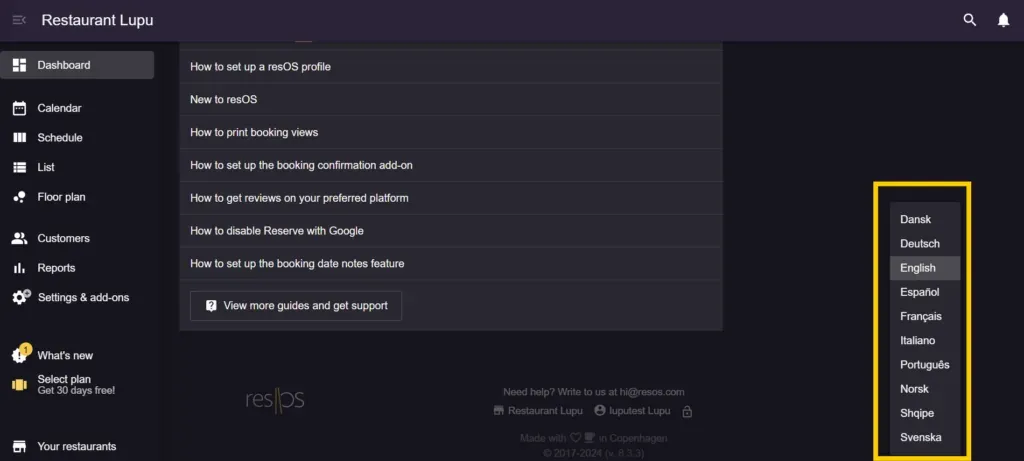
1. Log in to your Resos account, then choose the preferred language in the footer of the Dashboard, on the lower right side of the screen.
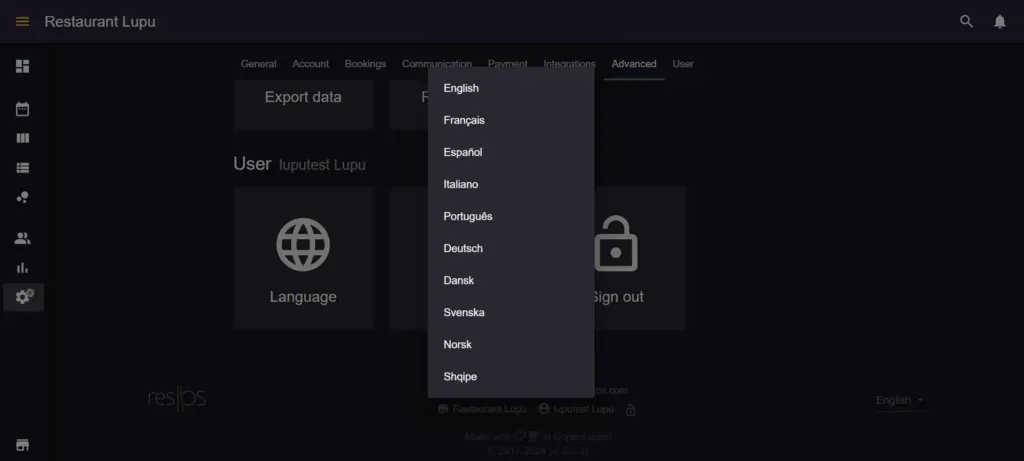
- Log into your Resos account → Settings & add-ons → User → Language.
What language do printed reservation signs use?
Printed reservation signs, the small signs you put on a table with the guest’s name and arrival time, are printed in the language of the person printing them. They follow that staff member’s own dashboard language, set in either of the two places above.
They do not follow the guest’s language, and there is no restaurant-wide setting for them. If two colleagues print signs for the same evening with their profiles in different languages, the signs come out in different languages.
To print in another language, change the language on your own profile first, then print. You print signs from a booking’s own menu with Print reservation sign, or from the List view by choosing Select signs to print and then Print selected.
Booking link/widget languages
Regardless of the chosen language for the internal users (restaurant staff and employees) the guests of the establishment can still choose the language they desire for the booking page/widget. Therefore, if you have guests from all over the world, they can choose their own language for the booking page, and this won’t affect the internal interface, or the external one (as the chosen language won’t be the default one for the other guests).
Multiple languages for external use
The booking page and widget have their own language list, and it is not the same as the dashboard list above. Guests can choose between these 18 languages, with German offered both as standard German and as a Swiss German variant, so the picker itself shows 19 entries:
-
Catalan
-
Danish
-
Dutch
-
English
-
Finnish
-
French
-
Georgian
-
German (including a Swiss German variant)
-
Greek
-
Hungarian
-
Italian
-
Latvian
-
Norwegian
-
Polish
-
Portuguese
-
Spanish
-
Swedish
-
Ukrainian
The two lists overlap but neither contains the other. Albanian is missing from the booking page’s language picker, so guests cannot pick it from the list. The booking page still opens in Albanian for a guest whose browser is set to Albanian, and ?lang=sq on your booking link forces it. Dutch, Finnish, Greek, Polish and Ukrainian are the other way round: guests can pick them, your staff cannot.
How to choose the preferred language externally
Your guests can choose the language that they prefer in two simple steps:
- Access the booking page/widget.
- Go on the lower right side of the booking page/widget and choose the language from the multiple languages options.
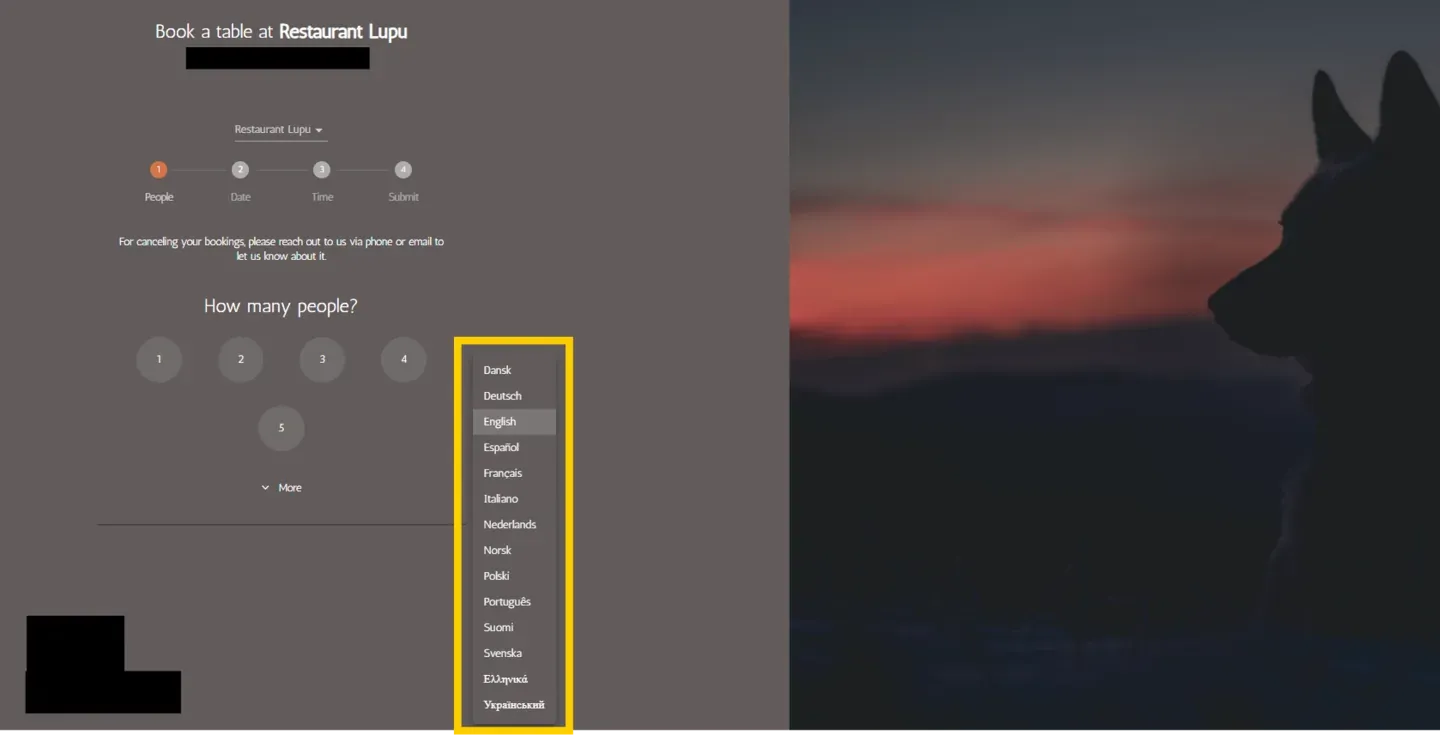
If you want every guest to land in the same language regardless of their own browser or device, see how to set a default language for booking guests.
Text you write yourself is not translated
Resos translates its own labels and buttons into the guest’s language. The text you type into your settings is shown exactly as you wrote it, to every guest, whatever language they picked. There is one text field per item, with no language switch next to it.
This applies to:
- Area name and Note to guests on an area (shown when guests can choose between areas).
- An opening hour’s Title and Note, and the waitlist Note to guests.
- The Booking notice and Custom fully booked message.
- Custom terms & conditions.
- An experience’s Experience name and Description, and the Card title and Card description of the Regular booking card.
- A custom field’s Label and Help text.
If your guests speak several languages, write these texts so they work for all of them, for example a short line in two languages, or a name that needs no translation such as “Terrace”.
Two kinds of text can be set per language:
- Notification texts: the top and bottom text added to booking emails and SMS. See how to customize booking notifications.
- Booking page texts, with the Custom design add-on: go to Menu → Settings & add-ons → General → Design → Texts, pick the Language, and edit the headlines, buttons and payment messages for that language. A field left empty uses the default translation. See how to set up custom design settings.
If you’d like to read more about multiple languages, check out this article here.


