


Define booking duration by number of people
In this article
Do you have bookings with different number of people quite often and you wish they would automatically get a different booking duration? It makes sense if you want bigger parties to spend more time in your establishment, so we created a feature that can help with that. To help you optimize your seatings and fit in more bookings, you can define the duration of a booking based on how many guests is the booking made for.
Video walkthrough
This short video covers booking duration in Resos, including how to add duration rules based on the number of people:
How to set this up?
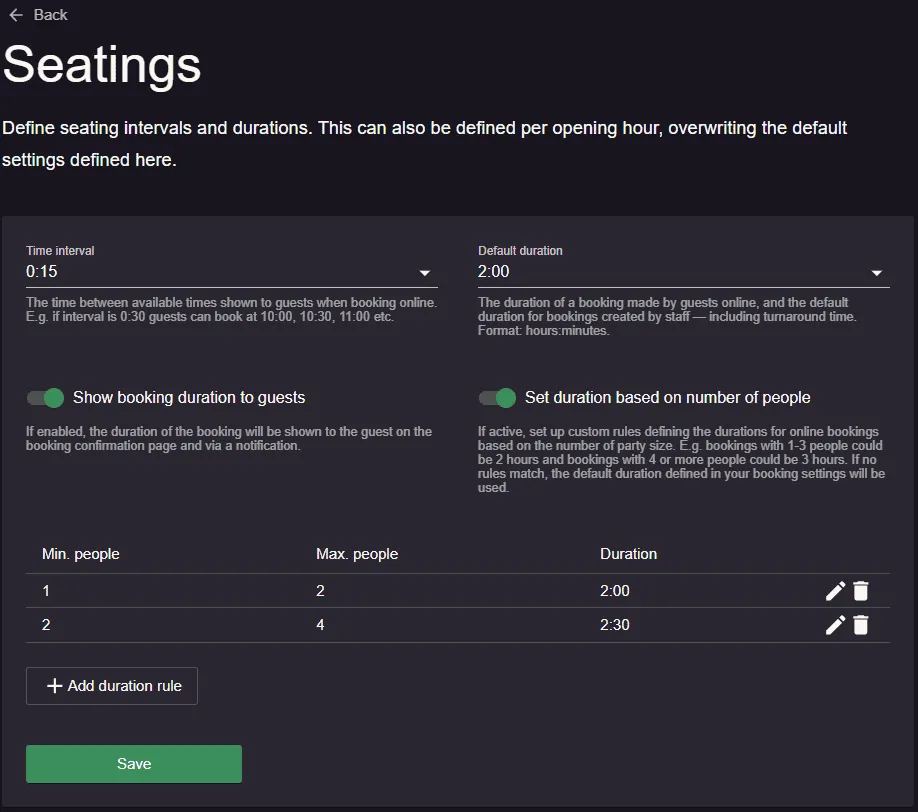
There are only two simple steps to set up different booking durations:
- Go to Menu → Settings & add-ons → Bookings → Seatings.
- Enable “Set duration based on number of people” and add as many duration rules as you need.
If you would like to edit the booking duration rules, you can do that by clicking on the pen icon. For deleting a duration rule, simply click on the trash icon and it’s gone!
This is the default booking duration based on the party size, meaning that it will apply to all the opening hours unless this is further customized for each opening hour.
How to further customize it?
If you offer more types of services (lunch, dinner, Taco Tuesday, etc.) and you have different opening hours for these, you can also customize the duration based on the number of people. You simply need to go to Menu → Settings & add-ons → General → Opening hours → Seatings → Set duration based on number of people.
If you’d like to see how your duration rules affect the last booking slot for different party sizes, open a specific opening hour. The system shows the last booking slot (from your general settings) for each configured party size, so you can quickly verify your booking cut-off times.
Can I set one last booking time for every party size?
No. Resos does not have a “last booking time” setting. It always works the last bookable slot backwards from the closing time of the opening hour, using that party size’s duration. So once your durations differ by party size, your cut-off times differ too.
The second time field on an opening hour is Guests leave by, not the last time a guest can book. Resos calculates each last slot like this:
Last booking slot = the latest start time on your booking interval, counted forward from the opening time, that still leaves room for that party size’s duration before the closing time.
Here is a worked example. Say an opening hour runs from 17:00 to 23:00, your time interval is 15 minutes, and you have three duration rules:
| Party size | Duration | Last booking slot |
|---|---|---|
| 1 to 3 people | 1:30 | 21:30 |
| 4 to 6 people | 2:00 | 21:00 |
| 7 to 12 people | 2:30 | 20:30 |
The example writes the times in 24-hour form, and your dashboard shows them in its own time format, so 21:30 can read as 9:30 PM. Bigger parties always get the earlier cut-off, because their booking has to finish by the same closing time. You can see the exact result for your own setup in the Last booking slot list on the opening hour, so you never have to do the arithmetic yourself.
What you can do instead
Give every party size the same cut-off: turn Set duration based on number of people off and use a single Default duration in Menu → Settings & add-ons → Bookings → Seatings, then open each opening hour and turn the same setting off there too, because an opening hour with its own duration rules overrides the general ones. With one duration everywhere, every party size gets the same last booking slot. Read more in booking duration.
Keep variable durations and aim the closing time: decide the cut-off you want for your biggest parties, add their duration to it, and set Guests leave by to that time. Smaller parties will still be offered later slots, which is often what a restaurant actually wants.
Stop online bookings after a set time on one date: add a special opening hour set to Closed with a time interval, and use Close from and Open again at to cover the part of the evening you want to protect. Every start time inside that window disappears from the booking page, whatever the party size, although a booking that starts before the window and runs into it is still offered, experiences keep their slots unless you set the closed scope to cover both, and with opening hours per area a closure only affects the areas it covers. This covers a single date, so it is not a way to build a permanent weekly cut-off.
Furthermore, Resos offers the option to customize time intervals too, find out more about this here.
Do you need help with setting up a booking duration based on the size of the party? No worries, our support team can help you right away. You simply have to reach out to them at hi@resos.com!


