In this article
- Key takeaways
- What is restaurant table management software?
- What table management software actually does
- Do you actually need table management software?
- How to evaluate table management software: a buyer’s checklist
- Free restaurant table management software: what “free” actually includes
- What makes a table management system “the best” for your restaurant
- Common mistakes when choosing table management software
- Frequently asked questions
- Bottom line
Restaurant table management software turns your floor plan into a live map of the room: which tables are free, which are booked, and which are about to turn, updated in real time instead of scribbled on a paper chart or buried in a flat list of reservations. If you are choosing between a plain reservation system and something built for the floor, this guide covers what the software actually does, whether your restaurant needs it, and how to evaluate the free and paid options without buying more than you use.
Key takeaways
- Table management adds a spatial layer to your booking system. It shows the room, not just a list of times, so you seat parties by table instead of by guesswork.
- You don’t always need it. Counter-service spots and very small dining rooms often do fine with a plain reservation list.
- “Free” is real for some vendors, not others. Check whether the free tier includes actual table management or just a booking form with table management behind a paywall.
- The best system is the one built into your booking system, not a separate tool you have to keep in sync with it by hand.
What is restaurant table management software?
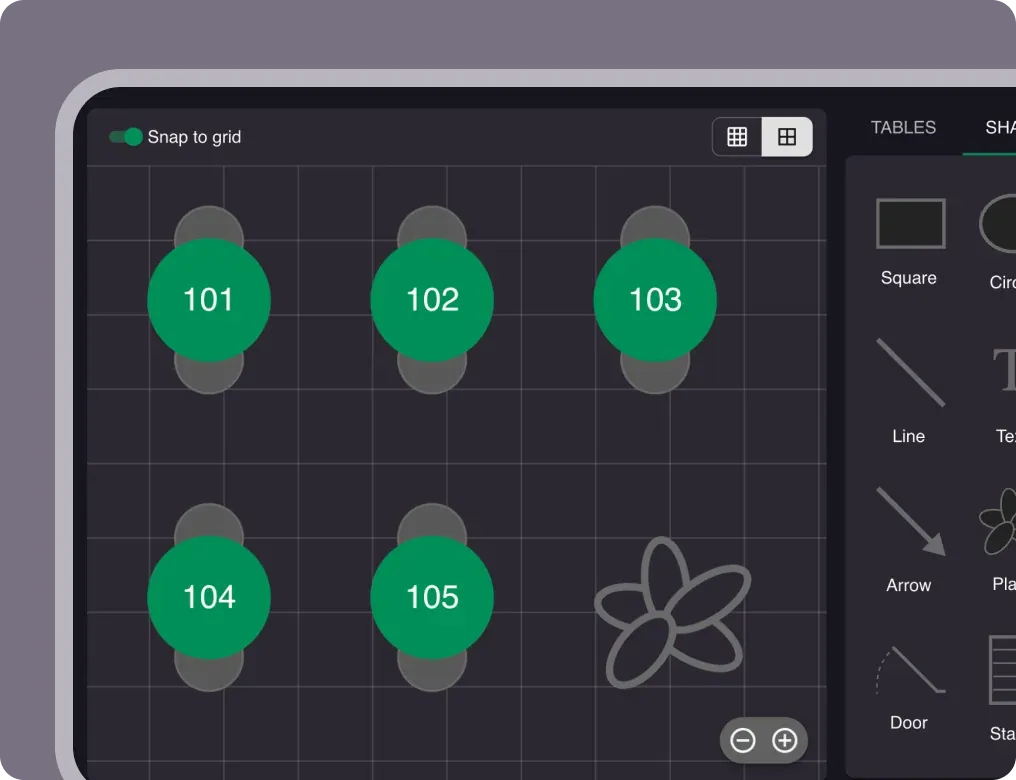
Restaurant table management software (sometimes sold as a “table management system” or “table management app”) lets you build a digital version of your dining room, assign reservations and walk-ins to specific tables, and see availability across the whole floor in real time. Instead of a flat list of names and times, you get a map: which tables are seated, which are free, which are about to turn over, and which two-tops can combine into a four-top when a bigger party walks in.
According to TouchBistro’s 2026 State of Restaurants report, 90% of full-service restaurant operators now use a reservation system of some kind. What a plain reservation system doesn’t do is tell you where to put the guest. That’s the gap table management fills: it takes the list you already have and lays it over the actual room, so a host can seat a walk-in in seconds and a manager can see the whole floor from a phone.
What table management software actually does
Strip away the marketing and every table management system does some combination of the following:
- Visual floor plan. A digital layout that mirrors your real room: tables, sizes, sections, bar seats, patio.
- Real-time availability. The booking page only ever offers tables that are actually free right now, not tables that look free on a schedule but are physically occupied.
- Table combinations. Flag which tables can join, and the system pairs two two-tops into a four-top automatically when the party size calls for it.
- Turn-time control. Set how long a table is held per seating (90 minutes for a quick lunch, two hours for a tasting menu), so the slot reopens the moment a booking ends.
- Seating priority. Fill your best tables first, so the window seat and quiet corner get booked before the tables next to the kitchen door.
- Sections and areas. Run indoor, patio, and private rooms as separate zones you can open or close on the fly, for weather or private events.
- Tablet and phone access. Most systems today are web-based, so the host stand, the floor staff, and the manager see the same live map without installing anything.
Not every vendor packages all seven. Some sell a bare-bones “table management app” that is really just a drag-and-drop floor plan with no live booking sync, which means someone still has to update it by hand. Confirm the sync is automatic before you buy.
Do you actually need table management software?
Not every restaurant does, and buying more than you need is a common mistake in this category. It’s a good fit if any of the following describe your restaurant:
- More than a handful of tables, or a layout with multiple sections
- Regular walk-ins on top of reservations, which means the floor changes minute to minute
- Tables that combine for larger parties
- More than one person seating guests, so everyone needs to see the same up-to-date floor
It’s usually overkill if you’re counter-service, have a handful of tables with no combinations, or run entirely by walk-in with no reservations to reconcile against the room. In those cases a plain reservation list, or no booking system at all, does the job without adding a tool to learn.
How to evaluate table management software: a buyer’s checklist
Once you’ve decided you need it, the differences between vendors come down to a short list of practical questions. Use this as your evaluation checklist:
| What to check | Why it matters |
|---|---|
| Does it sync automatically with online bookings? | A floor plan you update by hand after every reservation defeats the point. |
| Can tables combine automatically? | Without this, a party of four for a taken four-top means manual rework every time. |
| Can you set turn times per service? | Fixed intervals waste capacity at lunch and undersell it at dinner. |
| Is it built into your booking system, or bolted on? | A separate tool means two systems that can disagree about what’s free. |
| Does it work on the devices your team already has? | If it needs a specific tablet or app install, that’s friction on a busy night. |
| What’s the pricing model? | Flat monthly fee vs. per-cover charges changes your cost as you grow, not just today. |
| How long does setup actually take? | A floor plan you can build in under an hour beats a multi-week onboarding for a small or mid-size restaurant. |
The “bolted on” question is the one buyers skip most often. A table management tool that lives outside your booking system needs someone to manually reconcile the two, and that’s exactly the kind of manual step the software was supposed to remove. For an example of table management built as one system rather than a plug-in, see how Resos handles table management: the floor plan, the online booking page, and the waitlist all read from the same live data, so a cancellation frees the seat instantly everywhere at once.
Free restaurant table management software: what “free” actually includes
“Free” shows up a lot in this category, and it means different things depending on the vendor. Some offer a limited-time trial with a table management upsell waiting at the end. Others gate the floor plan behind a paid tier and only give you a plain list for free. A genuinely free plan should include the actual table management features, not a stripped demo of them.
Resos’ free plan includes the full visual floor plan and table management for up to 25 bookings a month, with no per-cover fees on any plan, free or paid. That’s the detail worth checking with any vendor claiming to be free: does the booking cap apply to the number of reservations, or does the vendor also charge a fee per seated guest once you’re using it? A monthly booking cap is a fair trade-off for a small or new restaurant. A per-cover fee on top of a “free” plan usually isn’t free at all once you’re busy. See the pricing page for the full breakdown of what’s included at each tier as your booking volume grows.
What makes a table management system “the best” for your restaurant
There’s no single best restaurant table management software, because the right fit depends on your floor. A 12-table bistro with no combinable tables has different needs than a 40-table dining room split across three sections. Instead of chasing a “best of” ranking, judge candidates against your own layout:
- Does it handle your actual table count and combinations, not a generic demo layout?
- Does the pricing make sense at your booking volume, not just at the entry tier?
- Can your team learn it in one shift, or does it need a training rollout?
A system that scores well on those three for your specific dining room beats a system that wins a generic comparison but doesn’t fit your floor.
Common mistakes when choosing table management software
Buying more capability than your floor needs. A complex, area-heavy system built for a 60-table restaurant is overkill, and often more expensive, for a 10-table cafe with a simple layout.
Treating it as separate from your booking system. If the table management tool doesn’t share live data with your online booking page, you’re maintaining two sources of truth, which is worse than the paper chart it replaced.
Ignoring the pricing model past the entry price. A cheap-looking plan with a per-cover fee can cost more than a flat subscription once you’re actually busy.
Skipping the free plan or trial. Building your real floor plan and running a few days of real bookings through it tells you more than any feature list. Most vendors, including Resos, let you do this before you pay anything.
Frequently asked questions
What is restaurant table management software? It’s software that turns your floor plan into a live, visual map so you can see which tables are free or booked in real time, assign reservations to specific tables, and seat parties efficiently. It sits on top of a plain reservation system, adding the spatial view a paper chart or a flat booking list can’t give you.
Is there free restaurant table management software? Yes, though the free tiers vary widely. Some gate the floor plan behind a paid upgrade; others cap the number of monthly bookings but include the full feature set for free. Resos’ free plan includes the complete table management feature set for up to 25 bookings a month, with no per-cover fees.
What’s the best restaurant table management software? It depends on your table count, layout, and booking volume rather than a single universal answer. Judge any candidate against your own floor: does it handle your actual tables and combinations, does the pricing hold up at your real volume, and can your team learn it in one shift?
Is a table management app different from table management software? Not meaningfully. “App” usually just refers to how the vendor markets the tablet or phone interface. The real question is whether it’s a full system (floor plan, live availability, combinations, turn times) or a simpler tool that only draws the layout without syncing to your bookings.
Do I need table management software if I already have a reservation system? Only if your floor is complex enough to need it: multiple sections, combinable tables, regular walk-ins alongside reservations, or more than one person seating guests. A small, simple room often runs fine on a plain reservation list alone.
Does table management software work with walk-ins and a waitlist? In a well-built system, yes. Walk-ins get seated against the same live floor plan as online bookings, and a waitlist feature should release a table straight into the next waiting party the moment it clears, instead of running as a disconnected list.
Bottom line
Table management software is worth adding once your floor gets complex enough that a plain list of reservations stops being enough to run the room: multiple sections, combinable tables, or walk-ins competing with bookings for the same seats. Judge any option against your own table count and volume rather than a generic “best of” ranking, confirm the free tier includes real table management rather than a demo of it, and prioritize a system built into your booking software over a separate tool you have to reconcile by hand.
Related: Restaurant table planner tips to boost revenue | Restaurant booking system cost | Build vs buy a restaurant booking system