In this article
Wrap restaurants are opening up in every city these days, and we can’t say that we don’t understand why, because who doesn’t like wraps!? Lunch rushes and group bookings can both put pressure on the floor, and lots of bookings mean lots of administration. And what better way to manage all your bookings than to get the markets most flexible and user-friendly booking system for wrap restaurants - Resos!

Set up seatings for your opening hours
The different seatings you add apply for different hours during the day. So you first need to go to your ‘Dashboard’ in the top right corner of the page and choose the menu ‘Opening hours’. As shown in the image below, there are small icons in line with some of the opening hours. These icons indicate the criteria for that seating. Now, let’s look into the different criteria you can choose for your wrap restaurant.
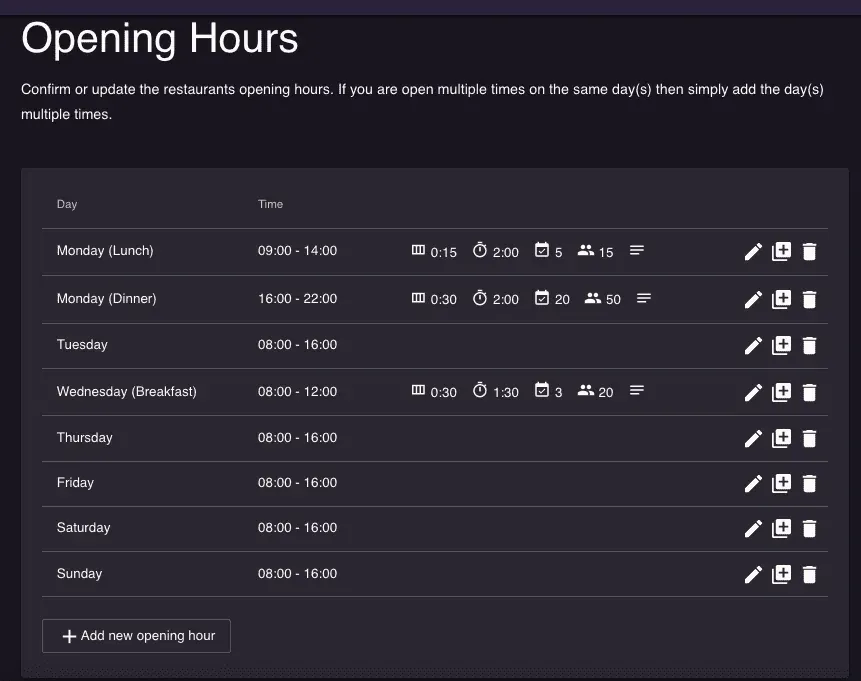
Choose different criteria for your seatings
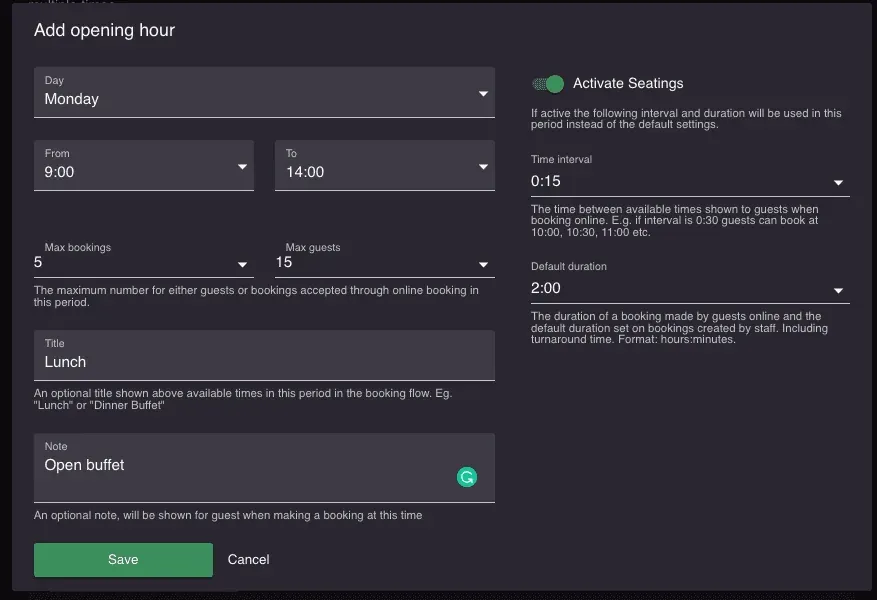
Press on the box ’+ Add new opening hour’ to add an opening hour or seating. You can add more than one seating per day. For each seating, you can add the following criteria:
- Opening hours for that seating - lunch could e.g. be from 9:00 - 13:00.
- The maximum number for either guests or bookings accepted through online booking for this seating. This allows you to add a limit of availability per seating.
- Title - An optional title for the seating that will be shown above available times on your booking page. This will make it clear to the guests that they are book a reservation for e.g. lunch or dinner.
- Note - An optional note, that will be shown for the guest when making a booking at this time
With Resos’ booking system for wrap restaurants, you can:
- Easily integrate your booking page on your website and on Google.
- Get notifications via SMS and email
- Get an overview of all your bookings and guests
- Manage tables, available times and areas in the restaurant
- View your future bookings and handle walk-ins
- Easily communicate with the guests directly through the system
- And lots more, that you can read about here
Reach out to us at hi@resos.com, and our amazing support team will help you integrate the system and get started today.