In this article
Send beautiful and personalized emails, manage lists and subscribers, and track your campaigns’ results using Resos’s integration with Campaign Monitor. There’s no need to email your guests individually when you can send group newsletters with Campaign Monitor and save yourself time and prevent human errors. You can also use signup forms to build your email list and create email templates easily with the drag and drop interface.
How can Campaign Monitor help you
Sending newsletters and updates to your guests doesn’t have to be a manual and time-consuming process. Instead, you can easily set up bulk emails using email marketing software, Campaign Monitor, which offers smart segments to personalize your emails!
Whether you want to update your guests about your new services and offers or keep them in the loop about what’s going on with your business, creating personalized emails can undoubtedly help you out with that. It has a ‘human approach’ and sends super relevant emails tailored to your guest’s individual interests. It is simple to use, and you can be up and running in a minute with Campaign Monitor email builder - no coding required.
Many of Resos’ guests find it helpful and easy to use our Campaign Monitor integration because sending newsletters with new, appealing offers or just reminders of their excellent services can encourage their guests to book with them more often!
You can do the same by activating the Campaign Monitor integration in your Resos account. Make the best out of the communication with your guests, which can be both professional and personal, when you choose to use Campaign Monitor to send emails to your guests all at once.
How to set up a connection to Campaign Monitor using Zapier?
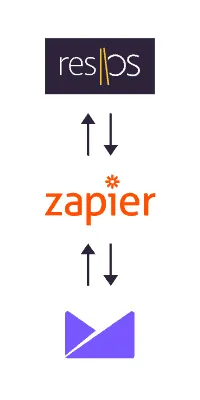
By choosing Resos to integrate your restaurant platform with Zapier and Campaign Monitor, you will simplify and automate your workflow. In a matter of minutes and without a single line of code, Zapier allows you to send relevant data between Resos and Campaign Monitor automatically.
For example, when you connect your Resos account to Campaign Monitor, you don’t have to worry about your collected data, and anytime you add a new guest to your list, it’s going to automatically add that contact to your Campaign Monitor list with their email address, name, and more. Additionally, you don’t have to worry about duplicating that data or remembering whether or not you’ve added that - Zapier will do that for you in the background automatically.
Furthermore, it will also allow you to keep track of your guests’ booking history, and use that valuable data to send personalized, promotional emails and offers to them.
Through Zapier, you can connect Campaign Monitor to another 3,000+ apps and systems to automate your work. Meaning, that there are no limits on how you utilize your data.
Steps to connect
- Log in or create new account with Zapier
- Connect your Campaign Monitor and Resos account
- Choose what data you want to be synced
- Your data will now automatically sync between Campaign Monitor and Resos
Do you need help getting started?
Our customer support team is always ready to help you! Write us at hi@resos.com